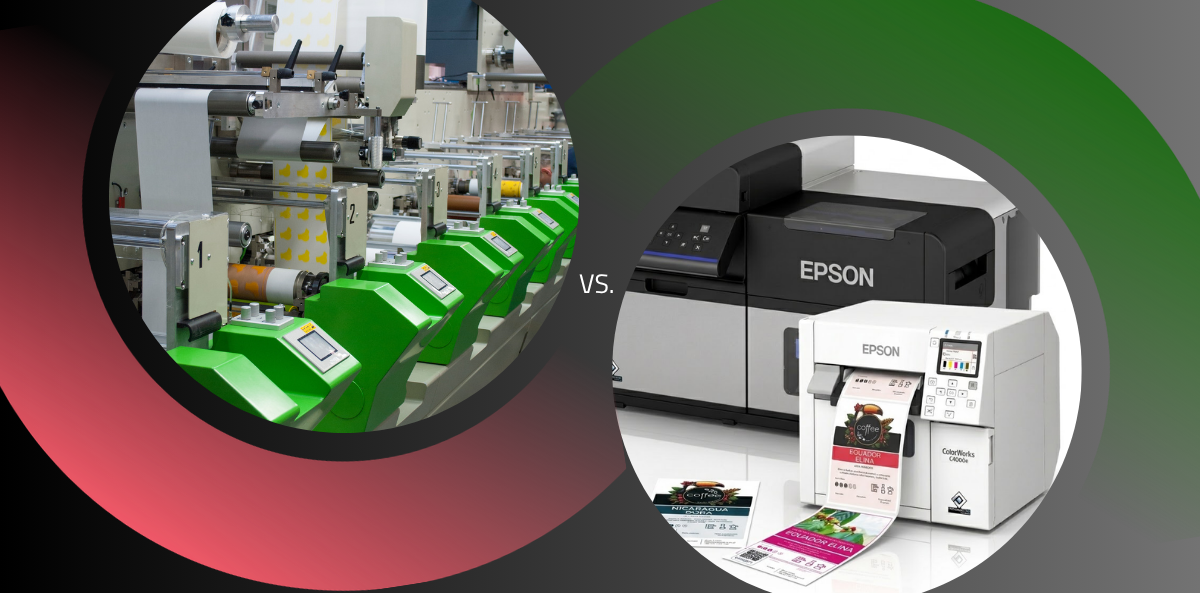
On-demand colour labels for coffee – EPSON ColorWorks label printers

An EPSON ColorWorks, colour label printer prints on-demand colour labels for coffee from 1 unit, on your own site, in a few minutes. You avoid the 5-14 day wait for an external print house and the minimum order quantity counted in thousands of sheets. Material and ink cost about 0.14 PLN per label in the 100 × 140 mm format at 50% colour coverage. This article shows how such a workstation operates in a coffee roastery. It also covers the specifications of each model and the production volume at which the investment pays back.
Table of Contents
A print house label and an on-demand label – the key difference
The difference is not the colour. The difference is the production model. The labels are made on your site, at the moment of packing, and not weeks in advance in a print house.
An order at an offset or flexographic print house has several stages. It starts with approval of the cutting die and the printing plate, continues with profile preparation, and ends with the minimum order quantity (MOQ). Print houses rarely accept orders below 2,000-5,000 units per design. The lead time is 5 to 14 working days.
On-demand printing reverses this logic. The whole production process moves to your plant or warehouse. You do not order finished prints in advance. You buy blank label rolls and pigment ink, and you start the print run when the coffee pack is filled.
| Parameter | Traditional print house (flexographic / offset) | On-demand printing (EPSON ColorWorks) |
| Minimum order quantity (MOQ) | usually 2,000-5,000 units per SKU | from 1 unit |
| Lead time | 5-14 working days | immediate, on your own site |
| Cost with many variants | cutting dies and prepress for every SKU | no extra charge for a design change |
| Response to a text error | the whole print run is scrapped | correct the file and reprint in a few minutes |
| Variable data (batch, date, QR code) | require an additional pass | native, straight from the database |
| Label stock in the warehouse | thousands of units must be held | no capital locked in labels |
Why coffee producers choose this model
Because one coffee in a roastery usually means several SKUs at once: weight, roast level, whole bean or ground, and target market. Each variant is a separate label. When labels are ordered externally, each variant must pass the MOQ threshold on its own.
Consider a specific case. A roastery introduces a microlot from Colombia – 80 kg of coffee. Packing it into 250 g bags requires 320 labels. The print house accepts orders from 3,000 units. The remaining 2,680 labels are waste: paid for, printed and never used.
An in-house print workstation answers four specific situations:
- Limited series and microlots. You print exactly 320 labels for a single harvest and not one unit more.
- Private label. A café orders 50 coffee packs with its own logo as Christmas gifts. The job takes a few minutes and does not need to pass any print house profitability threshold.
- Export and legal requirements. Different markets require different translations, ingredient lists and nutritional values. Moving from the Polish to the German market means changing a file in the software, not placing a new external order.
- Packing flexibility. The same coffee is sold in 250 g, 500 g and 1,000 g packs. You print the labels in the exact proportion in which the coffee leaves the roaster.
How on-demand printing with an EPSON printer works, step by step
The route from the graphic file to the label on the pack has five steps. With a finished template it takes a few minutes. The whole route runs inside one ecosystem implemented by Etisoft.
| Step | What happens | Tool |
| 1 | label artwork (PDF / PNG) | Adobe Illustrator, Photoshop |
| 2 | print control, variable data, colour matching | ETILABEL or driver / RIP |
| 3 | digital printing on the roll | EPSON ColorWorks, UltraChrome DL inks |
| 4 | lamination and die-cutting (optional) | digital finisher |
| 5 | application to the pack | hand dispenser or applicator on the line |
Preparing the graphic file
A designer prepares the label artwork in standard programmes such as Adobe Illustrator or Photoshop. The designer then exports it to a lossless PDF or PNG file. This step defines the physical dimensions of the label, for example 100 × 140 mm, and the colour profile. Etisoft engineers supply guidelines for file construction, so that frames and bleed match the requirements of roll-to-roll printing.
Loading the file and managing the print run
The finished file goes into ETILABEL, the Etisoft label design and printing software, or into a dedicated driver or RIP software.
The system takes variable parameters from the database: batch number, roast date, flavour profile, or a QR code that links to the roast curve. The operator matches brand colours with the Color Tone Matching Assistant and the Spot Colour Setting function in the Printer Setting Utility. This function maps a specific RGB value in the file to the value the printer actually achieves. The brand colour therefore stays identical between print runs.
Digital printing on the label roll
The PrecisionCore TFP printhead applies microdrops of pigment ink to the moving label roll. The print leaves the printer dry and smudge-resistant, because pigment ink fixes immediately. No drying or post-heating step is needed.
Speed depends on the selected quality mode, and this is the most common source of confusion in production planning. The stated 119 mm/s applies to the maximum speed mode at 300 × 600 dpi, not to the full 1200 × 1200 dpi resolution.
| Mode | Resolution | Speed (C6000, print width approx. 89 mm) | 500 labels 100 × 140 mm |
| Maximum speed | 300 × 600 dpi | up to 119 mm/s | approx. 10-12 min |
| Normal | 600 × 600 dpi | approx. 53 mm/s | approx. 20-25 min |
| Quality | 600 × 1200 dpi | approx. 18 mm/s | approx. 60-70 min |
| Maximum quality | 1200 × 1200 dpi | approx. 8 mm/s | approx. 2.5 h |
For a coffee label with a bean photograph and a gradient, the practical compromise is the 600 × 600 or 600 × 1200 dpi mode. The values come from the CW-C6000 series data sheet.
Lamination and die-cutting (optional)
Some labels require higher mechanical resistance, a matt finish, or a shape other than a rectangle – a circle, an ellipse or an irregular contour. The printed roll then passes through a compact digital finisher, which is a plotter or laser die-cutter. The digital finisher applies a thin protective laminate layer and cuts the required shape without steel cutting dies. This removes the prepress cost and prepress time at every change of shape.
Applying the label to the pack
The finished roll of printed labels goes to the packing station. The application method depends on the scale of the operation:
- Manually. The operator takes labels from the printer with a peeler, or a dispenser presents them one by one at the labelling station.
- Semi-automatically. An applicator presents the label when the photocell beam is interrupted.
- Fully automatically. The printer is integrated with a rewinding and application module, which applies labels to packs moving along the conveyor.
Colour quality and materials – does it look like print house work?
The most common concern of a roastery is this: will a label printed on site look cheap? The honest answer has two parts. At print runs of a few hundred units, digital printing gives a result that is hard to distinguish from flexographic printing. At very large and unchanging print runs, offset and flexographic printing still win on unit cost. They also win on special finishes such as gold foiling, embossing and metallic inks.
| Criterion | Offset / flexographic | EPSON ColorWorks |
| Image resolution | depends on the screen, typically 150-200 lpi | 1200 × 1200 dpi in maximum quality mode |
| Microtext (e.g. allergens at 4 pt) | good legibility | good legibility, without prepress |
| Barcodes and QR codes | need verification at every plate change | stable, printed straight from variable data |
| Special finishes | gold foiling, embossing, metallic inks | none; lamination and die-cutting available |
| Cost at 100,000 units of one design | lower | higher |
| Cost at 300-500 units of one design | higher, because of prepress | lower |
Unlike office printers with dye ink, ColorWorks uses durable UltraChrome DL pigment inks. After drying, these inks form a layer that resists:
- coffee fats and oils – oily compounds from dark roasted beans do not dissolve the print,
- UV radiation – labels on the shelf do not fade in strong light,
- abrasion and moisture – the print survives transport and refrigerated conditions.
Etisoft supplies inkjet-coated label materials for these printers:
- matt industrial paper – the natural, handmade look typical of the craft coffee segment,
- high gloss paper – the effect of a varnished surface, for premium brands,
- PP synthetic films – matt or glossy, and tear-resistant,
- eco and kraft paper – from recycled fibre or with natural fibres such as grass or sugar cane.
Specifications of the EPSON ColorWorks printers offered by Etisoft
The choice of model depends on two parameters: the maximum label width and the monthly production volume.
| Model | Max. media width | Max. resolution | Max. speed | Suggested monthly print run |
| ColorWorks C4000 (Ae/Pe) | up to 108 mm | 1200 × 1200 dpi | 100 mm/s | 5,000-15,000 units |
| ColorWorks C6000 (Ae/Pe) | up to 108 mm | 1200 × 1200 dpi | 119 mm/s | 10,000-50,000 units |
| ColorWorks C6500 (Ae/Pe) | up to 215.9 mm | 1200 × 1200 dpi | 85 mm/s | 10,000-50,000 units |
| ColorWorks C8000 | up to 112 mm | 600 × 1200 dpi | 300 mm/s | above 50,000 units |
| ColorWorks D6000 / D6500 | up to 108 / 215.9 mm | 1200 × 1200 dpi | up to 119 mm/s | graphic series, extended colour gamut |
The maximum speeds apply to the maximum speed mode. At higher resolutions the speeds are proportionally lower. The “Ae” designation means a built-in automatic cutter, and “Pe” means a peeler module that presents labels directly to the operator.
Print-on-demand. Flexible label printing by coffee producers
What it costs compared with a print house
At 60,000 labels per year split across 16 designs, an in-house workstation reduces the annual labelling cost by 19,000-31,000 PLN. That saving pays back the printer purchase in 6-14 months. At an unchanging print run of 100,000 units of one design, a high-volume print house still wins on unit price. On-demand printing is not a solution for mass production of a single SKU.
The example assumes a medium roastery with 12 permanently roasted coffees and 4 limited series per year. The total is 60,000 labels across 16 designs, ordered in batches of 300-500 units, with two production starts per design per year.
| Cost component | Scenario A: external print house | Scenario B: EPSON C6000 |
| High gloss paper label on the roll | – | 60,000 × 0.06 PLN = 3,600 PLN |
| Pigment ink at 50% colour coverage | – | 60,000 × 0.08 PLN = 4,800 PLN |
| Printing at the print house in small runs | 60,000 × 0.35-0.55 PLN = 21,000-33,000 PLN | – |
| Prepress and production start | 32 × 150 PLN = 4,800 PLN | 0 PLN |
| Disposal of outdated labels | 1,500 PLN | 0 PLN |
| Annual running cost | 27,300-39,300 PLN | 8,400 PLN + depreciation |
The difference in running costs is 18,900-30,900 PLN per year, and this difference funds the printer purchase. The break-even point for a C4000 or C6000 class printer therefore falls between month 6 and month 14. This calculation uses only the savings on prepress, on small print run surcharges and on eliminated waste. The unit cost of in-house printing in this example is 0.14 PLN per label in the 100 × 140 mm format.
Problems you may encounter
Every technology change in a plant requires preparation. Three difficulties occur most often during implementation, and each one has a ready solution.
| Problem | Why it occurs | Solution |
| The printed colour differs from the colour on the monitor | the monitor works in RGB, the printer works in CMYK on a specific material | Color Tone Matching Assistant and the Spot Colour Setting function: map the RGB value in the file to the target value from the colour chart |
| The label peels off a coffee bag with an aroma valve | matt and film-coated bags have low surface energy | rolls with rubber adhesive or reinforced acrylic adhesive, selected for PE, PP and kraft paper |
| Nozzles dry out during irregular printing | production gaps between print runs | Nozzle Verification Technology (NVT): automatic nozzle control, which detects and substitutes missing print dots without operator action |
Who is this solution ideal for?
| Production profile | Assessment | Why |
| Craft coffee roasteries | ideal | 100-3,000 labels per month, high SKU rotation |
| Medium roasteries with e-commerce and B2B | ideal | short print runs, export, customer private labels |
| Co-packers and contract roasteries | ideal | new artwork almost every day |
| Café and bistro chains | ideal | personalised packaging, promotional campaigns |
| Mass production of 1-2 fixed SKUs | not recommended | at hundreds of thousands of units without design changes, offset and flexographic printing are cheaper |
Two profiles ask for a quotation most often. Roasteries that are expanding export, because every market sets different legal requirements for label content, and a file change replaces a new print house order. And co-packers, because they pack coffee for external clients. The number of designs grows in line with the number of clients, while the print run per design stays small.
Summary
An on-demand label printing system based on EPSON ColorWorks printers shortens the launch of a new coffee from 5-14 days to a few minutes. The system removes the minimum order quantity (MOQ = 1 unit). At 60,000 labels per year across 16 designs, it reduces the annual labelling cost by 19,000-31,000 PLN.
Etisoft supplies the complete workstation, not only the printer:
- selection of the printer model to match your production volume and machinery,
- tested label materials – paper and film rolls with the adhesive selected for your specific pack,
- implementation of ETILABEL software for template management and variable data printing,
- ongoing technical support for integration, colour profiling and labelling processes, separate from the warranty service performed by authorised Epson service partners.
Want to print labels yourself? Have questions?
Frequently asked questions (FAQ)
What is the minimum order quantity in on-demand printing?
There is no minimum print run: the MOQ is 1 unit. You can print a single test label, or exactly 47 labels if a print run produced 47 coffee packs.
Are labels from an EPSON printer resistant to coffee fat and moisture?
Yes. EPSON UltraChrome DL pigment inks on synthetic materials such as PP film, or on inkjet-coated papers, produce a waterproof print. The print resists smudging, coffee oils and mechanical abrasion.
How long does the colour last on the label after printing?
Pigment ink does not fade in shelf conditions, unlike the dye ink used in office printers. Resistance to UV, moisture and abrasion depends on the material. PP films and laminated prints give the highest resistance, and uncoated eco papers the lowest.
Can different language versions of a label be printed without changing the machine setup?
Yes. A language change means selecting a different file in the software, or taking the correct variant automatically from an ERP or WMS database. The printer needs no cleaning and no change of parts.
How much does an EPSON printer cost, and how much do consumables cost?
Printer prices start at about 1,500 EUR for office and industrial models of the C4000 class, and rise to the fully industrial series. Label material and ink cost 0.08-0.20 PLN per label, depending on format and colour coverage.
Do I need to employ a designer to print my own labels?
No. A designer prepares the template once. After that, an employee in the roastery or warehouse selects the coffee name from a list in ETILABEL and enters the weight and roast date. The system generates the print-ready layout.
What does printhead maintenance and printer service involve?
The PrecisionCore printhead is a permanent component, and NVT technology detects and clears blocked nozzles without manual cleaning. Service has two parts. Authorised Epson service partners perform repairs and handle the hardware warranty. Etisoft technical support covers implementation, colour profiling, integration with ETILABEL and the selection of label materials.
Does EPSON digital printing handle QR codes and variable data?
Yes. A resolution of up to 1200 × 1200 dpi allows printing of QR codes, GS1 barcodes and microtext with a batch number or roasting time. Variable data comes from the database at every print, without a separate machine pass.
What is the real quality difference between on-demand printing and offset?
On a typical coffee label the difference is hard to see without a magnifier. Offset and flexographic printing keep their advantage in special finishes: gold foiling, embossing and metallic inks. They also keep it in unit cost at large unchanging print runs.
Can lamination and die-cutting be connected to the print workstation?
Yes. The printed roll passes through a compact digital finisher, which laminates and cuts the required shape without steel cutting dies. This is the solution for non-standard labels – circle, ellipse, contour – and for labels that need higher mechanical resistance.
How long does it take to print 500 coffee labels?
500 labels in the 100 × 140 mm format equal 70 metres of material. On the C6000 model this takes about 10-12 minutes in maximum speed mode (300 × 600 dpi). Normal mode (600 × 600 dpi) takes 20-25 minutes, and quality mode (600 × 1200 dpi) about one hour.
Does the print workstation require special room conditions?
No. ColorWorks printers are clean and quiet. They need no chemical extraction, no industrial ventilation and no specialist installation. They operate in standard office or warehouse conditions: 15-35 °C and 20-80% humidity.