Products

Application

obszar-laboratoryobszar-manufakturingobszar-office

Colour label printers

Inkjet and laser printers allow you to print colour labels and variable information on demand, i.e., without preparing printing plates. Thanks to them, manufacturers and retailers can print high-quality colour stickers as needed. Self-printing of colour labels with any graphic design enables you to reduce the cost of keeping a (...)

Read more Inquiry

Colour printers for labels and product markings

Colour printers enable the fast printing of professional product, advertising and promotional labels without having to order large print runs from a printing house. They allow labels to be printed on demand in full colour, with variable information, in any number of copies. The Etisoft range includes industrial colour printers from renowned manufacturers: Epson ColorWorks, QuickLabel and TrojanLabel.

Epson ColorWorks colour printers

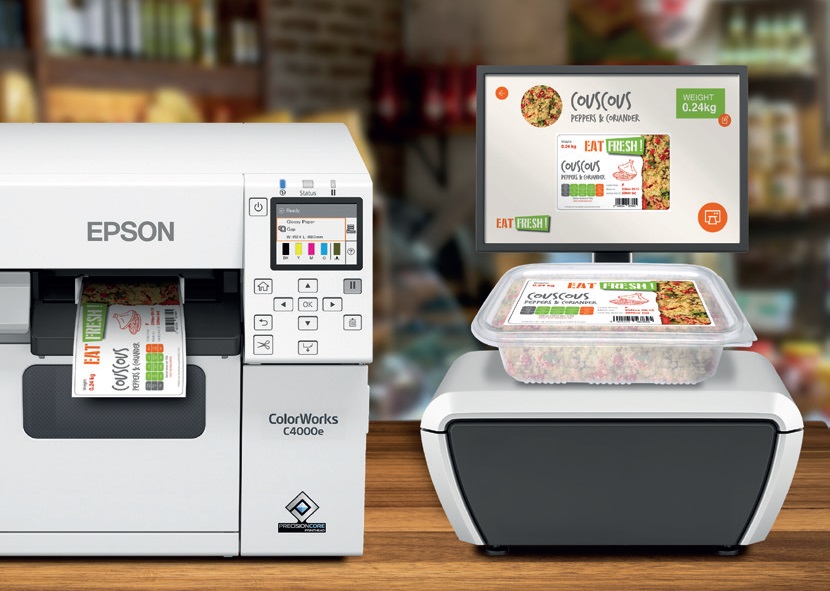
Epson ColorWorks colour printers use PrecisionCore inkjet technology, which delivers very good quality for graphics, barcodes and fine fonts. Epson printers are ideal for short production runs and everyday product marking. Users can print labels in full colour without having to store large stocks of ready-made markings. With colour label printers, even single copies can be printed. ColorWorks printers are used in the food, cosmetics and chemical industries. A key advantage of these devices is the ability to quickly change the label design at no extra cost.

Parameter Epson CW-C6000AE Epson CW-C6500AE Epson CW-D6000PE Epson ColorWorks C8000e BK
Print width up to 4″ (approx. 108 mm) up to 8″ (approx. 215 mm) up to 4″ (approx. 108 mm) up to 4″ (approx. 108 mm)
Ink type pigment pigment water-based (dye) pigment
Automatic cutter Yes Yes No Yes
Label peeler No No Yes Optional
Application product labels large GHS labels applications requiring label peeling high production volumes
Throughput high high high very high
Print quality very good very good very good the best in the series

The CW-C6000AE is one of the most popular Epson colour printers for product labels. It is chosen by manufacturers of cosmetics, dietary supplements, food and household chemicals. The CW-C6500AE printer is a development of the C6000AE model. It prints wider labels. It works well for marking drums, chemical containers, pallets and large bulk packaging. The Epson CW-D6000PE printer with a built-in label peeler meets the expectations of the premium cosmetics industry. The C8000e BK model is the most efficient solution among the compared models. It is used in large production plants and companies printing thousands of labels a day.

QuickLabel colour printers

QuickLabel colour printers ensure high print quality for product labels. The devices make it possible to create colour labels for small and medium production runs. Thanks to on-demand printing, companies can reduce the costs of ordering and storing labels. QuickLabel models offer high print resolution. They reproduce logos, graphics and legally required information perfectly. These printers are chosen by manufacturers of food, beverages, cosmetics and dietary supplements.

TrojanLabel industrial colour printers

TrojanLabel colour printers were created for companies handling larger label production volumes. They are suitable for intensive use. This brand’s solutions are used in production plants and label printing houses. Advanced printing systems make it possible to obtain durable, attractive and resistant product markings. TrojanLabel printers shorten order lead times and increase the flexibility of production processes.

Is a colour label printer worth choosing?

Colour label printers allow you to print exactly as many markings as you need at any given moment. You can print single labels, each with different graphics, a different barcode and different product data. Colour label printers eliminate the problem of excess stock and costly design changes made by external printing houses. The ability to personalise labels makes it easier to launch new products and adapt markings to customer requirements. On-site printing increases a company’s independence from external suppliers.

How to choose the right colour printer?

The choice of the right colour label printer depends on:

  • the number of labels printed,
  • the label width,
  • the required print quality,
  • the type of consumables.

Colour label printers are available in many variants – with a 4” or 8” printhead width, with label peeling, with a cutter, with glossy or matte ink. Choosing the right printer will help optimise product marking costs. Etisoft specialists will help you choose a solution tailored to your needs.

Applications of colour printers in various industries

Colour label printers are used in many sectors of the economy. In the food and textile industries they are used to print product and promotional labels – especially in small businesses such as coffee roasteries, which need colour labels to mark small product batches. Cosmetics manufacturers use them to create visually attractive packaging markings. In the chemical and pharmaceutical industries they enable the printing of labels containing the required safety information.

Label printers – I am interested in the cosmetics industry with small production runs

The production of premium cosmetics in small series requires printing labels practically in single copies. In such conditions, Epson ColorWorks and QuickLabel colour printers work best, allowing labels to be printed on an ongoing basis. They make it possible to create professional markings without ordering large print runs from a printing house. This is the ideal solution for manufacturers of natural cosmetics and premium brands.

I plan to print labels in the food industry – what should I choose to start with?

In the food industry, the ability to quickly adapt labels to production batches is important. At the start of a business, Epson ColorWorks and QuickLabel printers work perfectly. They allow you to print small and medium label runs without investing in large print volumes. Thanks to on-site printing, you can update ingredients, nutritional values and promotional markings. High print resolution guarantees high-quality full-colour label printing and the legibility of barcodes and product information. This solution reduces costs and increases production flexibility.

I need a printer for the pharmaceutical sector with high precision

The pharmaceutical industry requires high-quality markings and legible data. In this case, Epson ColorWorks printers and selected QuickLabel models work well. These devices enable precise printing of small fonts, 2D codes and barcodes. High print resolution makes it possible to meet strict product traceability requirements. On-demand printing allows labels to be quickly adapted to changing regulations. We recommend this solution to manufacturers of medicines, dietary supplements and medical devices.

I want to print labels in medium monthly volumes

Small production plants and craft businesses need a fast and reliable way of marking products. For small to medium monthly volumes, Epson ColorWorks and QuickLabel printers are a good choice. They allow you to print colour product and promotional labels. The ability to personalise markings supports marketing activities. Thanks to colour printers, small and medium-sized businesses can also mark their products with very attractive colour labels.

Which software should I choose for creating colour labels?

For designing and printing labels on Epson colour printers, the Polish software ETILABEL is recommended. It is professional and intuitive product label design software that combines advanced features with ease of use. ETILABEL allows you to create labels with barcodes, texts and graphics in jpg, png and bmp formats. With ETILABEL you can quickly prepare, edit and print colour labels in single copies on Epson printers.

Inquiry

FAQ – Colour printers

How to print full-color self-adhesive labels?

Full-color self-adhesive labels can be ordered from a label manufacturer or printed independently on a color printer. Inkjet printers or LED color thermal transfer printers are designed to print self-adhesive labels with variable designs. Color label printers provide:
• fast on-demand printing,
• high-quality full-color printing,
• the ability to print variable data and codes on each label,
• short run or large volume printing.

Which printer is best for printing color labels?

The most popular and versatile are the EPSON ColorWorks color label printers. EPSON CW printers enable companies to create high-quality color labels fast. EPSON color label printers print on paper, white, or transparent polypropylene film labels. Inkjet printing is resistant to moisture, UV rays, and chemicals.
Check the prices of EPSON color printers

Is it possible to print labels in color?

Yes, it is. The printing method depends on how many colors you want on the label. Full-color labels are printed on color inkjet printers, such as EPSON ColorWorks. If you need to print your company logo or a pictogram in a different color on a thermal transfer label, you can do this in two steps. First, print the standard black text and barcodes on the labels using a black ribbon. Then rewind the printed label roll and load it back into the printer. Replace the black thermal transfer label with the colored one (e.g., red, blue, yellow) and print the colored element on the labels in the second pass.

Which printers print in colour?

Both inkjet and laser printers provide colour printing. For product labels, professional printers such as Epson ColorWorks, QuickLabel or TrojanLabel are most commonly used.

How much does a colour label printer cost?

Colour label printers start from around PLN 5,000 net for a desktop-class device. Colour label printers for high volumes cost from several thousand to several tens of thousands of zlotys, depending on the print width and resolution as well as additional equipment.

Low running costs matter to me. What should I pay attention to?

In addition to the price of a colour label printer, the cost of consumables is important – the prices of labels, inks and waste ink containers. For industrial applications, the total cost of ownership of the device should be analysed.

Back to top